
Instagram users share more than 95 million photos and videos every day, which makes standing out harder than ever. Animated GIFs help solve that problem because they grab attention faster than static images. Many brands in the USA also use GIF-style content to increase engagement on Stories and Reels. In fact, short moving visuals often perform better during seasonal campaigns like summer travel promotions in Florida or winter holiday sales in New York. However, Instagram does not support traditional GIF uploads directly from your gallery. You need to convert or upload them in the correct format to make them work smoothly.
Why Animated GIFs Work So Well On Instagram
Animated GIFs add movement without requiring a full video production setup. They quickly capture attention while users scroll through crowded feeds. Moreover, they help brands and creators express emotions, reactions, and product features in seconds. Small businesses across the USA often use GIFs during weather-based promotions, such as cozy winter coffee ads in Chicago or sunny beachwear launches in California.
People also respond well to playful and short-form visual content. Therefore, GIFs can increase interaction on Stories, DMs, and Reels. They work especially well for tutorials, announcements, memes, and product reveals. In addition, GIFs make content feel more dynamic without needing expensive editing tools.
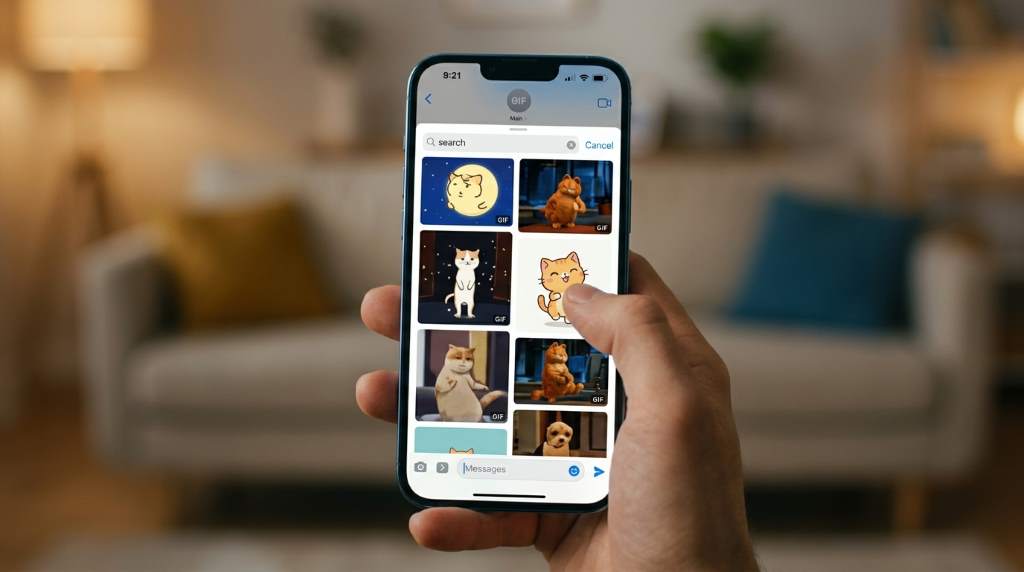
Can You Upload GIFs Directly To Instagram?
Instagram does not allow direct GIF uploads from your phone gallery like standard photos. Instead, the platform converts supported uploads into video formats. Because of this limitation, users need to change GIF files into MP4 videos before posting. Thankfully, several apps and online tools make this process very simple.
Most creators use apps like GIPHY, Canva, or EZGIF for conversion. These tools help maintain animation quality while matching Instagram’s supported formats. Furthermore, they work on both Android and iPhone devices. Once converted, you can upload the file like any regular video post.
Best Ways To Post Animated GIFs On Instagram
Use The GIPHY App
The GIPHY app offers one of the easiest methods for posting animated GIFs on Instagram. After downloading the app, search for the GIF you want to share. Then, tap the Instagram sharing option inside the app. GIPHY automatically converts the GIF into a video format that Instagram accepts.
This method works especially well for trending memes and reaction clips. Many USA-based influencers use it during live sports events, holiday seasons, and entertainment discussions. Additionally, the app maintains decent animation quality during conversion. As a result, your content looks polished and professional.
Convert GIFs Into MP4 Videos
You can also convert GIF files manually before uploading them to Instagram. Websites like EZGIF and CloudConvert allow quick GIF-to-video conversion. After conversion, save the MP4 file to your device. Then, upload it through Instagram as a Reel, Story, or Feed post.
This approach gives you more control over quality and file size. It also helps businesses maintain branding consistency. For example, travel agencies in snowy Colorado may use winter-themed animated ads with custom branding elements. Similarly, fashion stores in sunny Los Angeles often create GIF-based product showcases for seasonal collections.
Create GIF-Style Reels
Many creators now design short looping videos instead of traditional GIFs. This strategy works better because Instagram heavily promotes Reels in its algorithm. You can create looping animations using Canva, Adobe Express, or CapCut. Then, upload the final video as a Reel.
Looping Reels often gain more visibility than feed posts. In addition, they support music, text overlays, and effects. Brands across the USA frequently use this method during climate-based campaigns. For instance, home improvement companies may create storm-preparation animations during hurricane season in Texas.
How To Post GIFs On Instagram Stories
Instagram Stories support GIF stickers directly through the GIPHY integration. Open your Story camera and upload a photo or video background first. Then, tap the sticker icon and choose the GIF option. Search for any animation and place it anywhere on the Story.
This feature works well for quick engagement boosts. Many businesses use GIF stickers during weather-related promotions, holiday events, or flash sales. For example:
- Coffee shops in Seattle may add rainy-day GIF stickers
- Ski resorts in Utah often use snowfall animations
- Beach resorts in Miami frequently add sunny tropical GIFs
- Retail stores in Boston use holiday-themed animated stickers
You can also resize and move GIF stickers freely. Therefore, Stories become more interactive and visually appealing.
Steps To Upload GIFs As Instagram Feed Posts
Posting GIFs in the Instagram feed requires a few simple steps. However, the process becomes easy after your first attempt. Follow this method for smoother uploads and better quality.
- Convert the GIF into MP4 format
- Save the converted file to your device
- Open Instagram and tap the plus icon
- Select the MP4 file from your gallery
- Edit the cover image and caption
- Add hashtags if needed
- Publish the post normally
Always preview the video before posting it publicly. Some GIFs may lose quality during conversion if the file size becomes too large. Therefore, use high-quality conversion tools whenever possible.
How To Add GIFs To Instagram Reels
Reels offer one of the best ways to share animated visuals on Instagram. Since the platform prioritizes video content, Reels often reach larger audiences. You can upload converted GIFs directly or create loop animations inside editing apps.
First, convert the GIF into MP4 format if needed. Next, open Instagram Reels and upload the file. Then, add music, captions, filters, or transitions to improve engagement. Finally, publish the Reel with an optimized caption.
Short looping clips perform especially well during seasonal USA trends. During summer, travel creators often share animated beach clips from California or Hawaii. Meanwhile, winter campaigns in Alaska and Minnesota frequently use snow-themed looping animations for higher engagement.
Common Problems When Posting GIFs On Instagram
Poor Image Quality
Low-quality GIFs often appear blurry after conversion. This issue usually happens when the original file resolution is too small. Therefore, start with high-resolution GIF files whenever possible. You should also avoid compressing files too heavily during conversion.
Upload Errors
Instagram sometimes rejects converted GIF videos because of unsupported formats. In most cases, re-exporting the file as MP4 solves the problem. Additionally, ensure the file size stays within Instagram’s upload limits. Stable internet connections also reduce upload failures significantly.
Animation Stops Playing
Some uploads appear as static images instead of moving animations. This problem occurs when users upload GIF files directly without conversion. Always convert GIFs into video formats before posting them. That way, Instagram recognizes them correctly.
Best Apps For Posting GIFs On Instagram
Several apps simplify the GIF posting process. Each platform offers different editing and conversion features. Therefore, choosing the right app depends on your content goals.
Top Recommended Apps
- GIPHY for direct Instagram sharing
- Canva for custom animated graphics
- CapCut for looping Reel creation
- Adobe Express for branded animations
- EZGIF for fast online conversion
Many USA-based creators combine multiple tools for better results. For instance, small businesses often design animations in Canva and finalize edits in CapCut. This workflow improves quality while keeping content visually consistent.
Tips To Make GIF Content More Engaging
Animated content performs best when it feels natural and relevant. Random animations rarely build meaningful engagement. Therefore, focus on creating GIFs that match your audience interests and current trends.
Use bright visuals and readable text for better mobile viewing. Since most Instagram users browse on phones, clarity matters greatly. Also, keep animations short and easy to understand. Fast-moving visuals usually hold attention longer.
Timing also affects engagement rates. For example, winter-themed GIF campaigns work best during colder months in northern USA states like Michigan and Wisconsin. On the other hand, tropical summer animations often perform better in warm-weather regions such as Florida and Arizona.
How Businesses Use GIFs For Instagram Marketing
Brands increasingly rely on GIFs for marketing campaigns because they create quick emotional connections. Restaurants use animated food showcases to attract customers instantly. Fitness brands also use short looping workout clips for motivation-focused campaigns.
Retail businesses often create holiday-themed GIF promotions throughout the year. During Black Friday in the USA, many stores use animated countdown graphics and flashing discount messages. Likewise, tourism companies use scenic loop animations to promote destinations during peak travel seasons.
GIFs also improve audience interaction in Stories and DMs. Brands use them for polls, reactions, and event announcements. Because of this flexibility, animated content has become a core part of Instagram marketing strategies.
SEO Benefits Of Using GIFs On Instagram
Although Instagram itself does not directly rank GIFs in Google search results, engaging visual content improves overall profile performance. Higher engagement can increase profile visibility and audience growth. Therefore, animated content indirectly supports social media SEO strategies.
GIF-based Reels also encourage more watch time and shares. These engagement signals help Instagram promote content to wider audiences. In addition, branded animations improve content recognition over time. Consistent visuals strengthen audience trust and brand recall.
Mistakes To Avoid When Posting GIFs
Many users make simple mistakes that reduce content quality and engagement. Fortunately, avoiding these issues can improve results quickly.
Common GIF Posting Mistakes
- Uploading raw GIF files without conversion
- Using blurry or low-resolution animations
- Adding too much text on small screens
- Ignoring Instagram Reel dimensions
- Posting unrelated trending GIFs excessively
Overusing animations may also overwhelm followers. Therefore, maintain a balanced content strategy with photos, videos, and GIFs together.
Future Of GIF Content On Instagram
Instagram continues pushing short-form video content aggressively. Because of this trend, GIF-style looping videos will likely become even more important. Many creators already replace traditional GIFs with animated Reels for better reach.
AI-powered animation tools are also making content creation easier than before. Businesses can now create custom animated visuals in minutes instead of hours. As competition grows, creators who use engaging motion content effectively will stand out faster.
Brands in climate-diverse USA regions will likely continue adapting animations for seasonal promotions. For example, spring flower animations may trend in Washington during cherry blossom season, while desert-themed summer content could dominate Arizona campaigns.
Conclusion
Learning how to post animated GIFs on Instagram can dramatically improve your content engagement and visibility. Although Instagram does not support direct GIF uploads, converting them into MP4 videos solves the problem quickly. You can also use GIPHY stickers, looping Reels, and animation apps for better results. Moreover, strategic animated content helps brands and creators stand out in crowded feeds. Start experimenting with GIF-style posts today and build more engaging Instagram content that captures attention instantly.
FAQs
Can Instagram upload GIF files directly?
No, Instagram requires GIFs to be converted into video formats like MP4 before uploading.
Which app is best for posting GIFs on Instagram?
GIPHY is one of the easiest and most popular apps for sharing GIFs on Instagram.
Do GIFs work better in Reels or feed posts?
GIF-style looping videos usually perform better as Reels because Instagram promotes Reel content more heavily.
Why does my GIF lose quality on Instagram?
Low-resolution files or heavy compression during conversion often reduce GIF quality.
Can I add GIFs to Instagram Stories?
Yes, Instagram Stories include built-in GIF stickers through the GIPHY integration feature.
Related Reads
Read more: How To Retrieve Snapchat Messages
Discover: How to Apply the 5 Key Points About Social Media Marketing Correctly