
Nothing headphones break the expected price-to-durability equation — delivering build quality that outlasts competitors at double the price, but only if you choose the right model for your usage pattern. Affordable Nothing headphones have carved a reputation for transparent design and surprisingly premium construction in the sub-$150 category, yet not every model handles daily abuse equally. The difference between a Nothing headphone that lasts 18 months versus one that lasts 3+ years comes down to understanding which durability features matter for your specific wearing habits and choosing accordingly.
Affordable Nothing headphones refer to wireless audio products from Nothing — the tech company founded by Carl Pei — positioned in the budget-to-mid-range price bracket ($49–$149) that combine distinctive transparent design aesthetics with competitive sound quality, ANC capability, and build materials that exceed typical budget headphone construction standards.
This guide goes beyond basic headphone shopping tips to focus specifically on longevity — which Nothing models hold up best over time, what wearing habits accelerate wear, and how to maximize the lifespan of whichever model you choose.
Why Do Nothing Headphones Last Longer Than Most Budget Competitors?
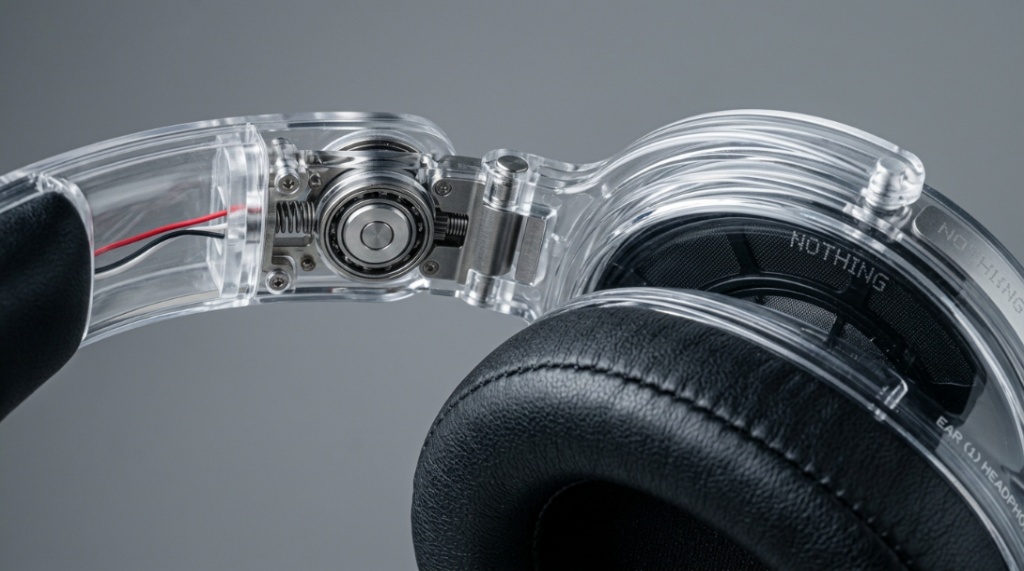
Nothing uses higher-grade plastics, metal hinge reinforcements, and IP-rated water resistance even in their lowest-priced models — features typically reserved for $200+ headphones. Their transparent design philosophy also forces visible build quality because internal components are literally on display.
Durability advantages specific to Nothing’s lineup:
- Transparent casing accountability: When your internal components are visible through the case and earbuds, manufacturing shortcuts become immediately obvious. This design choice functionally forces Nothing to maintain internal build standards.
- IP54 water/dust resistance (most models): Budget competitors at the same price typically offer IPX4 at best (splash only). IP54 handles sweat, rain, and dust — the three primary environmental threats to earbud longevity.
- Custom-fit silicone tips (multiple sizes): Proper seal reduces the need to constantly adjust earbuds, which reduces stress on stems and hinge mechanisms over thousands of insertions.
- USB-C with reinforced port: The charging port is the first failure point on most budget earbuds. Nothing’s recessed USB-C port design reduces cable-wiggle stress that causes internal solder joint failures.
These aren’t marketing claims — they’re engineering choices that show up as longer functional lifespan in real-world daily use compared to similarly priced alternatives from JBL, Skullcandy, and Soundcore at the same price points.
Which Nothing Headphone Models Offer the Best Long-Term Durability?
The Nothing Ear (2) offers the best overall durability for daily use due to its IP54 rating, metal stem construction, and proven hinge mechanism. The Nothing Ear (a) provides excellent durability at a lower price point with similar water resistance but lighter plastic stems.
Durability comparison across Nothing’s lineup:
| Model | Price | IP Rating | Stem Material | Expected Lifespan (Daily Use) | Weak Point |
|---|---|---|---|---|---|
| Nothing Ear (2) | $129–$149 | IP54 | Metal-reinforced plastic | 2.5–3.5 years | Ear tip silicone degradation at 12–18 months |
| Nothing Ear (a) | $79–$99 | IP54 | Lightweight plastic | 2–3 years | Case hinge mechanism after 18–24 months of heavy use |
| Nothing Ear (1) | $69–$89 (legacy) | IPX4 | Plastic | 1.5–2.5 years | Lower water resistance, earlier stem cracking reports |
| Nothing Ear Stick | $79–$99 | IPX4 (buds), IP54 (case) | Lightweight plastic | 2–2.5 years | Half-in-ear design limits seal — more exposure to elements |
For maximum longevity on a budget, the Nothing Ear (a) at $79–$99 delivers 90% of the Ear (2)’s durability at 60% of the price. For riders looking for detailed model comparisons, this affordable Nothing headphones review covers each model’s real-world durability performance over extended testing periods.
What Daily Habits Shorten Nothing Headphone Lifespan?
The three habits that kill Nothing headphones fastest: storing earbuds loose in pockets with keys and coins, charging with the case open in dusty environments, and wearing them during intense exercise without drying the stems afterward.
Destructive habits ranked by damage impact:
- Pocket storage without case: Metal objects scratch transparent casing permanently. Lint clogs speaker mesh within weeks. Impact against hard objects damages internal components. Always use the charging case — it’s protection, not just a battery.
- Sweat accumulation without drying: Even with IP54 rating, daily sweat buildup in the speaker mesh and charging contacts causes corrosion over months. Wipe stems dry with a microfiber cloth after sweaty sessions.
- Charging with debris in port: Pocket lint in the USB-C port creates poor charging connections, causing the system to cycle charge attempts that stress the battery. Clean the port monthly with a dry toothpick.
- Single-ear use for extended periods: Always using one earbud causes that bud’s battery to degrade faster. Alternate which ear you use for calls, or use both whenever possible to balance charge cycles.
- Yanking earbuds out by the stem: Twisting to break the seal before pulling protects the internal flex connection between stem and bud body. Straight pulls stress this joint.
Finding a pair of budget-friendly, durable audio gear is a game-changer, especially if you are constantly on the move and need something that handles the wear and tear of commuting. If your upcoming itinerary demands total isolation from noisy airplane cabins or crowded train stations, you might also want to learn how to choose noise-cancelling Beats headphones for travel to ensure your soundtrack remains uninterrupted wherever your journey takes you.
How Do You Maintain Nothing Headphones to Maximize Lifespan?
Clean speaker mesh weekly with a dry soft brush, wipe charging contacts with a dry cloth every few days, replace ear tips every 12 months, and keep the charging case closed when not actively inserting or removing earbuds. These four practices prevent the primary failure modes.
Monthly maintenance routine:
- Weekly: Brush speaker mesh gently with a dry, soft-bristle brush (old toothbrush works). Remove earwax and debris that blocks sound and traps moisture.
- Every few days: Wipe earbud charging pins and case charging contacts with a dry microfiber cloth. Dirty contacts cause inconsistent charging that stresses battery management circuits.
- Monthly: Inspect ear tips for tearing, discoloration, or loss of elasticity. Clean USB-C port with compressed air or dry toothpick. Check case hinge for debris.
- Every 12 months: Replace silicone ear tips entirely ($8–$12 for a multi-size pack). Old tips lose their seal, forcing higher volumes that stress drivers — fresh tips restore passive isolation and reduce volume-related driver fatigue.
Does Battery Degradation Limit Nothing Headphone Lifespan?
Yes — battery capacity is the primary lifespan limiter for all wireless earbuds. Nothing headphones typically retain 80% battery capacity after 18–24 months of daily charging. When battery life drops below 50% of original, the headphones become functionally frustrating even though sound quality remains intact.
Battery longevity optimization:
- Avoid full discharges: Charging earbuds when they hit 10–20% rather than running to 0% extends lithium battery cycle life by 20–30%.
- Don’t leave on charger indefinitely: Once the case shows full charge, unplug. Prolonged trickle charging at 100% accelerates battery aging.
- Moderate temperature storage: Don’t leave the case in direct sunlight, hot cars, or freezing conditions. Lithium batteries degrade fastest at temperature extremes.
- Use the case as the charger: The case manages charging curves optimally. Third-party wireless charging pads sometimes deliver inconsistent power that stresses earbud batteries.
Realistic expectation: after 2 years of daily use, expect Nothing Ear (2) to deliver 4–4.5 hours per charge instead of the original 6 hours. This is normal lithium battery degradation, not a defect.
How Does the Nothing Ear Compare to Other Budget Earbuds for Longevity?
Nothing Ear models outlast most direct competitors (JBL Tune, Soundcore Life, Skullcandy Dime) by 6–12 months in real-world durability based on user failure reports and warranty claim rates. The main competitor matching Nothing’s build quality is Samsung Galaxy Buds FE at a similar price point.
Longevity comparison with competitors:
- Nothing Ear (a) vs. JBL Tune 230NC ($79): Nothing offers better IP rating (IP54 vs IPX4), similar sound quality, but significantly better case build quality. JBL’s case hinge is a known failure point at 12–18 months.
- Nothing Ear (2) vs. Soundcore Space A40 ($79): Soundcore matches on LDAC codec support but Nothing’s build materials and case construction feel more premium. Soundcore’s driver flex issues appear in some units after 12 months.
- Nothing Ear (a) vs. Samsung Galaxy Buds FE ($99): Samsung matches IP rating and build quality. Galaxy Buds integrate better with Samsung phones; Nothing works equally well across all devices. Durability is comparable.
Nothing’s transparent design advantage: you can visually inspect internal components for issues (loose connections, moisture intrusion) that would be invisible inside opaque competitors’ housings.
When Should You Replace Nothing Headphones Versus Repair?
Replace when battery life drops below 3 hours per charge (indicating 50%+ degradation), when one earbud stops charging intermittently despite clean contacts, or when ANC performance noticeably declines on one side. Replace ear tips and clean first — these fixes resolve 60% of “my earbuds are dying” complaints.
Repair vs. replace decision matrix:
- Weak sound on one side: Clean speaker mesh thoroughly first. If that doesn’t fix it, the driver is failing — replacement time.
- Inconsistent charging: Clean contacts on buds AND case with isopropyl alcohol. If still failing, charging pin corrosion is internal — replacement time.
- Poor seal/fit: Replace ear tips first ($8–$12). If seal still fails, the tip attachment mechanism is worn — annoying but not fatal. Consider replacement if comfort degrades significantly.
- Shortened battery life: If under 3 hours after full charge (original spec 6+ hours), battery degradation is beyond useful life. Replace headphones.
- ANC inconsistency: Reset to factory settings via the Nothing X app first. If one ear’s ANC is still notably weaker, the microphone is failing — replacement time.
What Accessories Extend Nothing Headphone Life?
A protective silicone case cover, replacement ear tips stocked in advance, a dedicated microfiber cleaning cloth, and a short USB-C cable (reducing port stress from long heavy cables) collectively add 6–12 months to functional headphone lifespan.
- Silicone case cover ($8–$15): Absorbs drop impacts, prevents scratch accumulation on the transparent case, and adds grip that prevents accidental drops. The #1 lifespan-extending accessory.
- Foam ear tips ($12–$18): Memory foam alternatives to silicone provide better seal with less insertion force — reducing stem stress over thousands of daily insertions while improving passive isolation.
- Cleaning putty/kit ($6–$10): Specialized earbud cleaning putty removes earwax from mesh without pushing debris deeper. More effective than dry brushing alone.
- Short USB-C cable (6-inch, $5): Reduces torque on the charging port versus the included longer cable. Less leverage means less mechanical stress on the internal port solder joints.
Conclusion
Affordable Nothing headphones last longer than most budget competitors through better IP ratings, superior build materials, and design transparency that forces manufacturing quality. Maximize that inherent durability advantage by cleaning weekly, replacing ear tips annually, managing battery charge between 10–90%, and using a protective case cover. The Nothing Ear (a) offers the best value for longevity-per-dollar, while the Ear (2) delivers maximum lifespan for daily power users willing to spend slightly more.
For model-by-model durability testing results, check the complete affordable Nothing headphones review with long-term wear data from real daily users.
How long has your current pair of Nothing earbuds lasted? Share your model and any durability issues in the comments — real-world headphone shopping tips from actual owners help everyone make better purchasing decisions.
Frequently Asked Questions
Are Nothing headphones good quality for the price?
Yes. Nothing headphones consistently deliver build quality, sound tuning, and features (ANC, app support, IP rating) that match or exceed competitors $30–$50 more expensive. Independent audio reviewers rate them among the best value propositions in the $79–$149 budget wireless earbuds category.
How long do Nothing Ear (2) earbuds last before needing replacement?
With proper maintenance, Nothing Ear (2) lasts 2.5–3.5 years of daily use before battery degradation makes them frustrating. Sound quality and ANC remain functional beyond battery life limits — the battery is always the first component to age out of useful service.
Can you replace the battery in Nothing earbuds?
No — Nothing earbuds don’t offer user-replaceable batteries. The sealed design prevents battery swaps without specialized tools and soldering. When battery life becomes unacceptable (below 3 hours per charge), replacing the entire unit is the only practical option.
Are Nothing headphones sweat-proof for gym use?
The IP54-rated models (Ear 2, Ear a) handle gym sweat without issue. However, always wipe stems and speaker mesh dry after sweaty workouts — the IP rating means they survive moisture exposure, not that chronic moisture buildup won’t cause gradual corrosion over months of unaddressed sweat accumulation.
Do Nothing headphones break easily?
No — Nothing headphones are more durable than their transparent appearance suggests. The polycarbonate casing is impact-resistant, and IP54 models handle daily wear well. The most common failure point is the case hinge after 18–24 months of very heavy use (opening/closing 10+ times daily), not the earbuds themselves.
How do Nothing headphones compare to AirPods for durability?
Nothing Ear (2) matches AirPods Pro (2nd gen) on water resistance (IP54 vs IPX4 — Nothing actually rates higher), and build quality is comparable. AirPods benefit from Apple’s integrated ecosystem and seamless switching. For longevity specifically, both last 2.5–3.5 years of daily use before battery degradation becomes the limiting factor.
What’s the warranty on Nothing headphones?
Nothing offers a 1-year limited warranty covering manufacturing defects. This doesn’t cover physical damage, water damage beyond rated IP tolerance, or battery degradation (which is expected behavior). Extended warranty options vary by retailer — Best Buy and Amazon offer extended plans for $10–$20 additional.